The co-parenting calendar & expense app

Two homes.
One shared page.

The calendar and the costs, in one calm place both parents see. Whose night it is, who owes whom, what got agreed to: answered before anyone has to ask.

Start free, no credit card
30 days free, then $59.99/year Both parents included Works on any device
twoporchlights.com
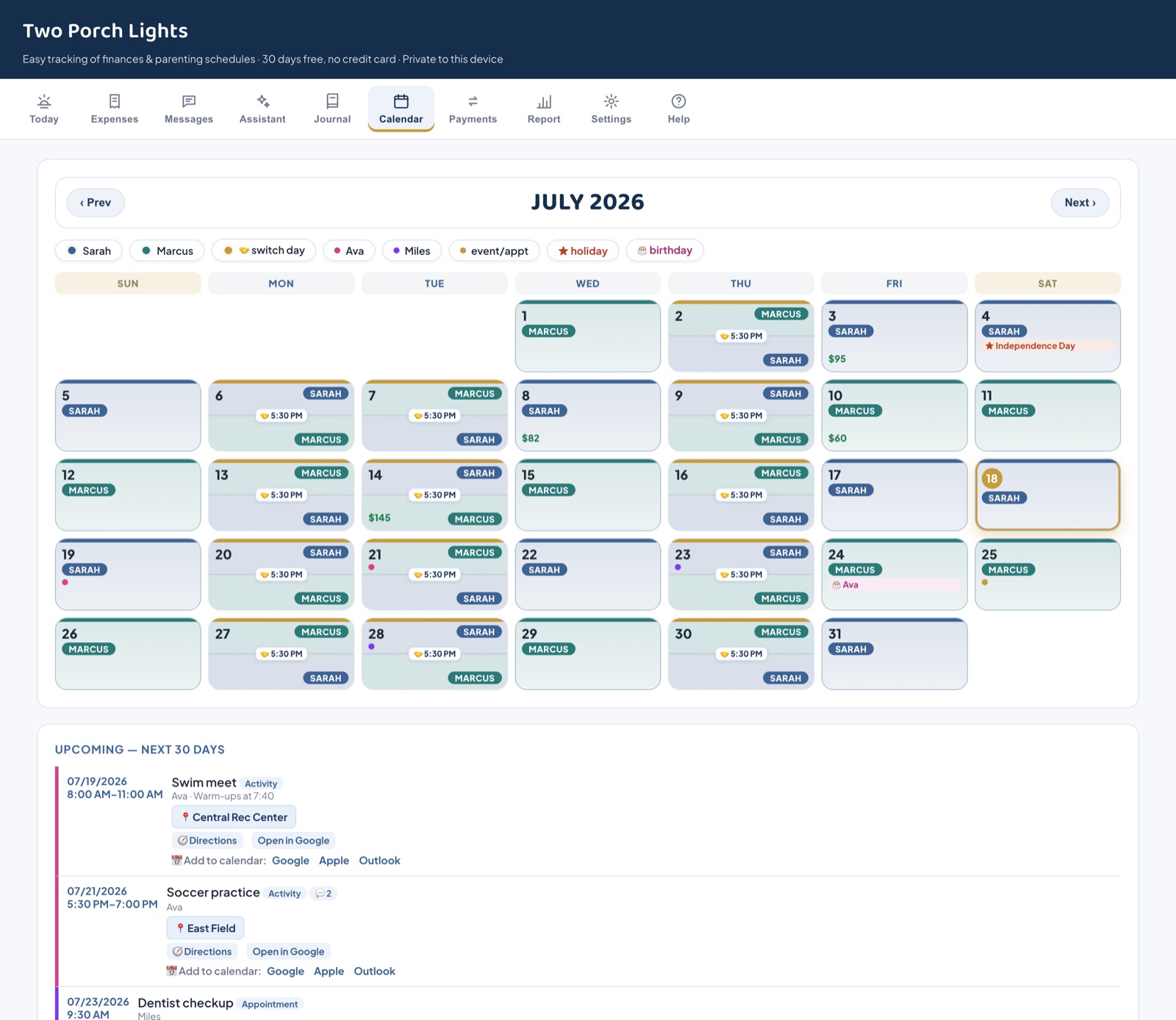
The Two Porch Lights shared calendar: each day color-coded by parent, switch days marked with the drop-off time, and events dotted in each child's color

One subscription covers both homes. $59.99 a year, about $5 a month, and your co-parent joins free. The big-name apps charge every parent separately. See the comparison →

What you actually get

The app, doing the job

These are real screens, not mockups. Everything below syncs live between both parents' phones.

The shared calendar

Whose night is it? Answered at a glance.

Every day is color-coded by parent, switch days show the drop-off time, and each child's activities carry their own color. Questions like "what time is pickup?" get asked and answered in comments right on the event, so the plan and the conversation stay together.

  • A color for each parent and each child
  • Comments on any event, with a notification to your co-parent
  • Paste a school email and AI puts the dates on the calendar
  • Holidays, birthdays, vacations, and live sync to Apple, Google, and Outlook
Shared calendar
Month view with color-coded parenting time and kid-colored event dots
The Today screen

Open the app, get your answer, get on with your day

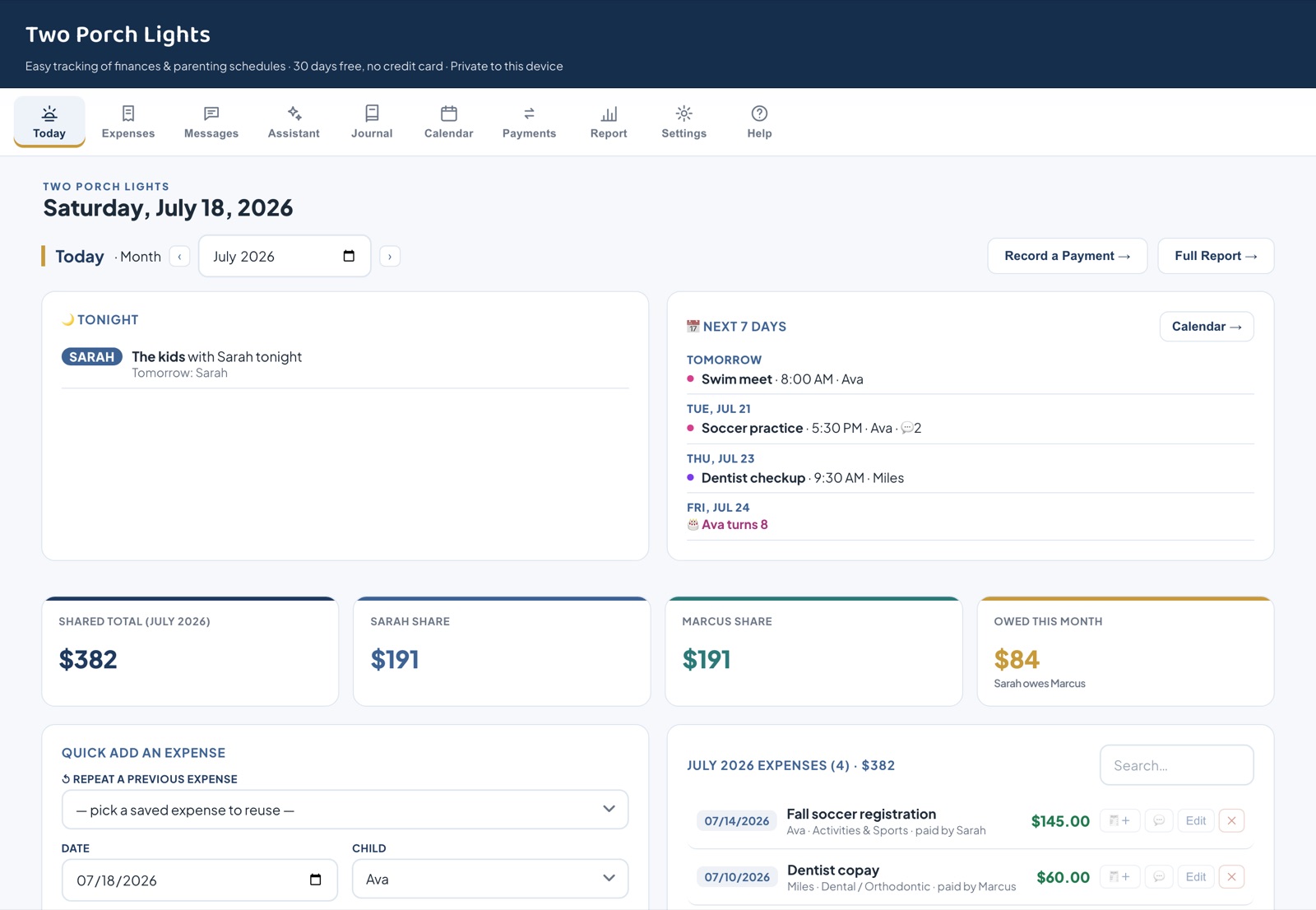
The app opens to tonight: whose house the kids are at, what's coming in the next 7 days, this month's balance, and anything new from your co-parent. Built for a parent checking their phone between meetings.

  • Tonight and tomorrow, per child
  • Switch days flagged with the handoff time
  • Who owes whom this month, one tap from settling up
Today
The Today screen: whose night it is, the next 7 days, and money at a glance
Expenses & receipts

Money without the argument

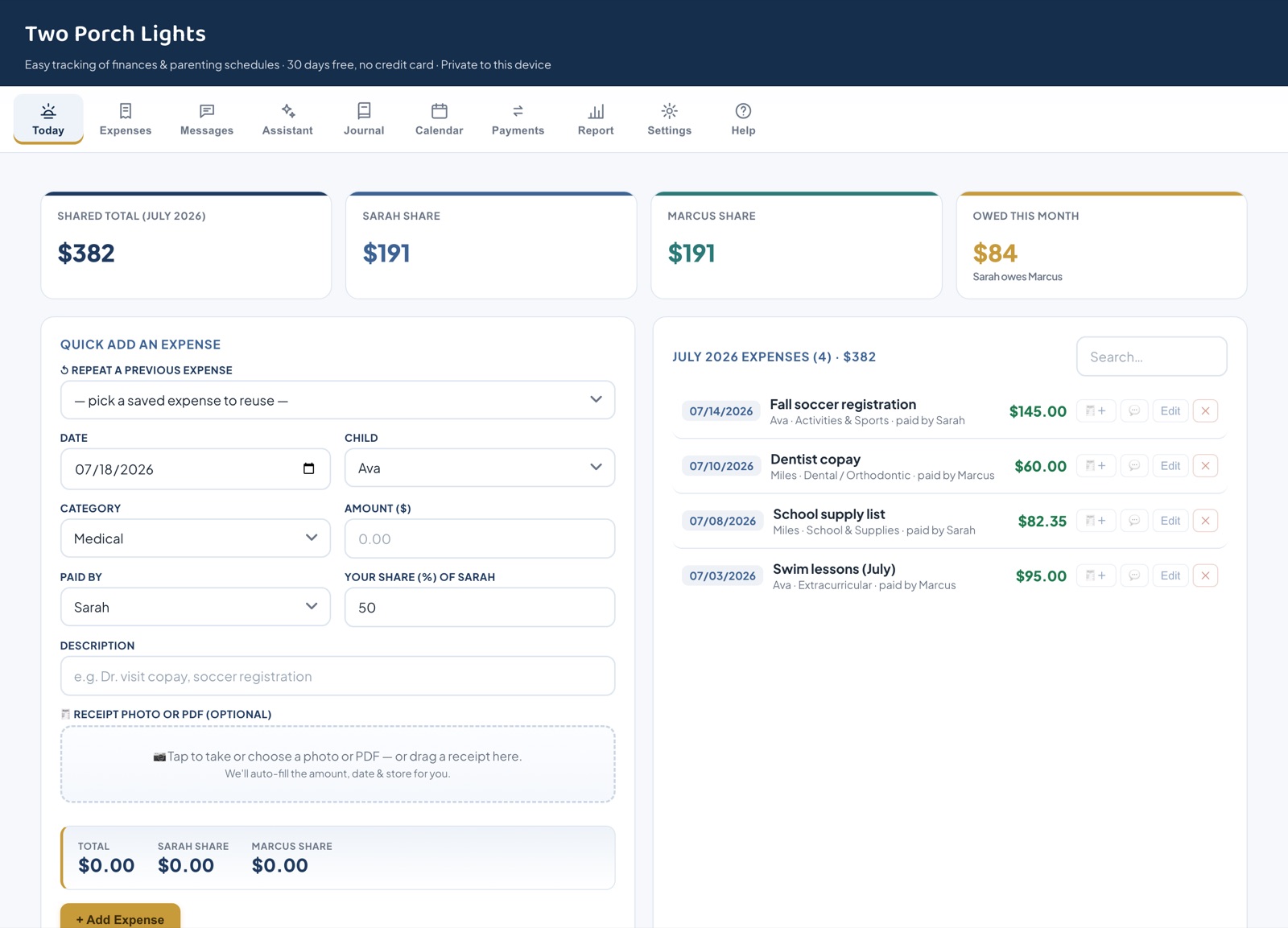
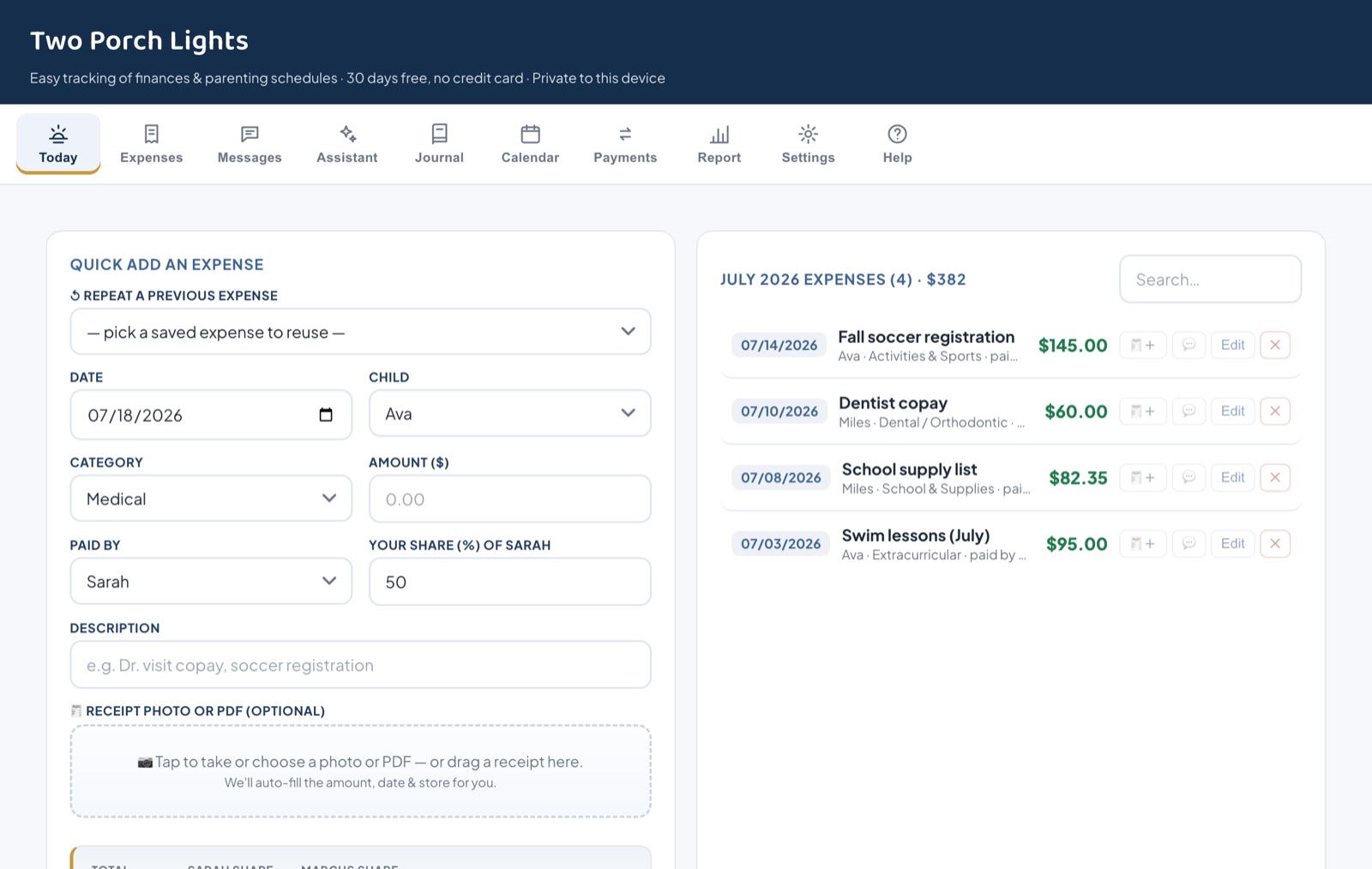
Snap a photo or upload a PDF of any receipt and AI fills in the amount, date, store, and category. Costs split by your percentages automatically, and each month ends with a clear number both parents agreed to.

  • Receipt photos and PDFs, read by AI
  • Splits follow your court percentages, editable per expense
  • Monthly close-out both parents sign off on
  • Settle up by Venmo, PayPal, Cash App, or Zelle links
Expenses
Quick Add an Expense with receipt drop zone and automatic split preview
Kid Kits

The bag that travels between homes

A shared checklist for each child: the inhaler, the cleats, the library book, the charger. Both parents see the same list, so nothing gets left at the other house. Bought something on the list? The money button starts a shared expense with the child and description already filled in, so you just add the amount.

  • One kit per child, visible from both homes
  • Check items off as they're packed
  • Start a shared expense from any item, child and description prefilled
Kid Kits
Kid Kits: shared per-child checklists with packed counts
And the rest of the toolkit

Everything else is included too

Parenting schedules

Week-on/off, 2-2-3, every other weekend, or a fully custom 2-week rotation. It fills the calendar in for you.

Messages with SoftenAI

One time-stamped thread. Wrote it heated? Tap Soften and AI rewrites it calm and child-focused. You choose which version sends.

Records, always in order

A private journal, one-tap exchange check-ins, and watermarked PDF exports of your message log.

Private Tax Center

529s, daycare, medical mileage auto-filled from two addresses, and an accountant-ready packet every January. Only you can see it.

Court plan importAI

Upload your parenting plan and AI drafts the schedule, holidays, and split for your review. You approve every line before it applies.

One shared view

Both parents log in and see the same calendar and expenses, synced live. Your co-parent joins free with a code.

Works on every device

iPhone, Android, tablet, or computer, right in the browser. Install it to your home screen like an app.

Private and secure

Optional two-factor authentication, and we never link bank accounts or move money between you.

Clear communication

Keep every conversation in one calm place

All your co-parenting messages in one organized, time-stamped thread, so nothing gets lost in scattered texts. And when a draft comes out heated, tap 🕊️ Soften: AI rewrites it calm and child-focused, and you choose which version sends.

🕊️ AI Soften tone coach Read receipts Attach documents Comments on calendar events Watermarked PDF export anytime
How we compare

The big-name features, without the big-name price

The same organized calendar, fair expense-splitting, and secure messaging the leading co-parenting apps offer, at a fraction of the cost, plus a few things they don't have.

  Two Porch Lights Typical co-parenting app
Cost for both parentsOne price, co-parent joins freeOften billed per parent
Start free30 days, no credit cardCard often required up front
Holiday and birthday exchange times✓ Built inRarely included
Comments on calendar events✓ Built inSeparate message thread only
School email to calendar import✓ AI-poweredPremium tier elsewhere, if offered
Import your TalkingParents history✓ FreeStart over from scratch
AI message tone coach ("Soften")✓ IncludedPremium add-on, if offered
Snap a receipt, auto-filled✓ AI-poweredType it in by hand
Built-in AI assistant✓ Private to each parentNot offered
Private time-stamped journal & exchange check-insRarely included
Private Tax Center: 529s, daycare, mileage, accountant-ready packet✓ Included with your plan, private to youNot offered
Custom and every-other-week schedulesLimited presets
Works on any phone or computer✓ In the browserApp-store apps only
Two-factor authentication✓ Optional, freeRarely offered
Your moneyNever linked or touchedSome take a cut of payments

Comparison reflects common paid co-parenting apps; features and pricing vary by provider and plan.

Start free, no credit card
Free download

The Parenting-Time Exchange Checklist

23 field-tested steps for calm handoffs, clean money habits, and records that stay in order. Free, straight to your inbox. No newsletter, no spam.

Up and running in a minute

How it works

No learning curve. If you can send a text, you can use this.

Set it up once

Add your kids, your cost-sharing split, and any child support. Takes about a minute.

Log costs as they happen

Add each shared expense and any payments. Edit anything later in a tap.

See who owes who

Open the dashboard for a clear monthly balance, and settle up with confidence.

A mother waiting under the porch light as her kids walk up the path at dusk

Exchange days end the way they should. The light's on at both houses.

Simple, honest pricing

Free for 30 days. No credit card.

Use everything free for 30 days. One simple yearly price covers both parents: calendar, parenting schedule, expenses, and live sync across all your devices. Cancel anytime.

30 days free, then pick a plan
$59.99/year
Best value: just $5/mo, billed yearly
OR
$7.99/month
cancel anytime · both parents included
One subscription covers both parents
  • Both parents included: your co-parent joins free with a code
  • Everything in the app: calendar, schedules, expenses, secure messaging and the AI assistant
  • AI extras included: message Soften coach, receipt scanning, school email import, year-end tax summary
  • Private Tax Center: 529s, daycare, medical mileage auto-fill, and an accountant-ready packet every January
  • Syncs live across all your phones and computers
  • Unlimited kids, expenses and history, plus PDF and CSV reports for your records
  • All updates included · cancel anytime · pay by card, Apple Pay, or Google Pay
  • Your data is always yours: export your records anytime; nothing is held hostage if you cancel
Start free, no credit card
Your subscription covers the shared space for your whole household. Your co-parent joins with a code, no second payment for the calendar, expenses, or messages. The private Tax Center is included with each parent's own plan. Keep it for $59.99/year after the free trial.
The price promise

$59.99 stays $59.99.

This app keeps growing, and the ideas come from the parents using it. When something gets built, it shows up in your account at no extra cost. What does not move is what you pay. Subscribe at $59.99 a year and that stays your price for as long as your subscription is active, however much the app grows.

What keeps changingNew features, shaped by what families actually ask for.
What never changesYour price. No tiers to upgrade into, nothing extra per parent, no quiet increase at renewal.
Good to know

Frequently asked questions

Does my co-parent have to pay too?

No. One subscription covers the shared space for both of you. Your co-parent joins with an invite code and never pays for the calendar, expenses, messages, or payments. The one personal extra is the private Tax Center: yours is included with your plan, and if your co-parent wants their own, they add their own plan.

Can it help at tax time?

Yes. The private Tax Center tracks 529 contributions, daycare and day camp, medical costs, kids' insurance premiums, and FSA reimbursements, and it auto-calculates medical-visit mileage from two addresses. One tap builds an accountant-ready packet for TurboTax or your CPA. It's private: your co-parent can never see it.

Do we need iPhones? Is there an app to download?

No. It runs in any web browser on iPhone, Android, tablet, or computer, and you can add it to your home screen so it works like an app. You and your co-parent don't need the same kind of phone.

Do you connect to my bank or move money?

Never. We don't link bank accounts or transfer funds between you. You settle up however you already do; we just keep an accurate, shared record of who owes whom.

What does it cost, and can I cancel?

30 days free with no credit card. After that, keep it for $59.99/year or $7.99/month, your choice, and it covers your whole household. Cancel anytime.

Is my information private?

Yes. Your data is yours, stored securely, and never sold. See our Privacy Policy for details.

Two Porch Lights app icon
Keep it one tap away

Add Two Porch Lights to your phone

Install it like an app: full-screen, with its own icon, and it even works offline. Nothing to download from a store.

iPhone / iPad (Safari)
Tap Share (□↑) → Add to Home Screen.
Android (Chrome)
Tap Install app below, or ⋮ menu → Install app.
Install app
Start free, no credit card